Troubleshooting
Every tool here runs entirely in your browser, with no server and no account — which is great for privacy, but it means a few things that are really about your browser, your OS, or a cloud-sync app can look like a bug in the tool. This page covers the ones we've actually seen, grouped by what we can do about them.
Fixed in the tools themselves
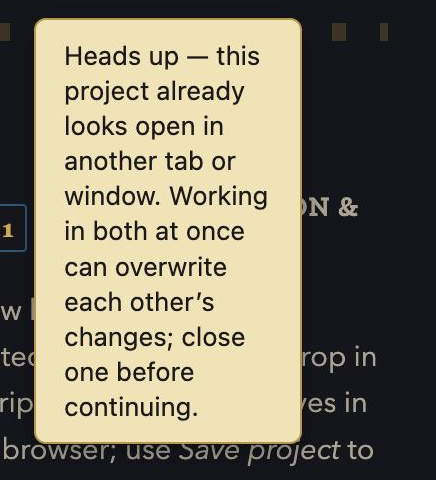
Symptom: a second tab or window of the same tool silently overwrote what you just typed, or a card/scene suddenly looked stuck and wouldn't drag. Every tool that autosaves to your browser (Schedule Builder, Paperwork Filler, both Pitch One-Pager Generators) now watches for another copy of itself open on the same file and tells you right away — a banner appears within a few seconds saying the project looks open elsewhere, before any work gets lost. Schedule Builder also self-heals if a drag gesture ever gets interrupted (losing focus mid-drag, a trackpad hiccup) instead of needing a reload. What to do if you still see the banner: close every other tab/window of that same file and keep just one open per project.
Common causes, with a quick fix
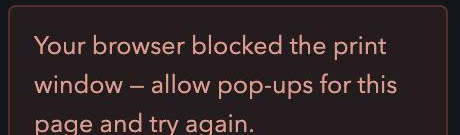
A print or export window never appeared. Your browser's pop-up blocker caught it. Look for a small "pop-up blocked" icon in the address bar and allow pop-ups for the page, then click the button again. (Most exports in this suite download a file directly instead of opening a print window for exactly this reason — this only affects the few that still use a print dialog, like Schedule Builder's Call Sheet.)
Your changes were there a minute ago and now the tool looks empty, or an old version of
your work came back. Check you're opening the same file you were working in, not a second
copy. Browsers and cloud-sync tools both create duplicates without asking — a re-download becomes
Schedule Builder (1).html, and iCloud Drive/Dropbox/OneDrive can split a file into
filename.html and filename (conflicted copy — your name's MacBook).html if it
was open on two devices, or still syncing, at the same moment you saved. Use Finder/Explorer's search
to check for more than one copy of the file, confirm the modified date matches when you last worked in
it, and keep the one real copy going forward — don't keep working across more than one.
Nothing you type seems to save at all, every single time, not just after a reload. Private/incognito browsing blocks the autosave storage these tools use, by design — the browser is doing what it's supposed to. Use a normal (non-private) window, or remember to use each tool's own Save project button and keep the downloaded file.
A drag doesn't do quite what you clicked. Browser zoom and OS display scaling both
shift where your click actually lands relative to what you see. Reset zoom to 100% (Cmd/Ctrl +
0) if a drag feels "off."
Can't fix on our end — here's what's happening and what to do
A trackpad gesture (two/three-finger swipe) interrupts a drag partway through. Some laptop trackpads interpret certain gestures as an OS-level action (switching desktops, swiping back) mid-drag, which can end the drag early. Use a plain single-finger click-and-hold-and-move, or the tool's click-to-place alternative where one exists, instead of a fast trackpad swipe.
A browser extension (ad blocker, privacy tool, script blocker) changes how a page behaves. These can block the local storage or scripts a tool needs to autosave or render correctly, with no error message pointing to the real cause. Try the tool in a private window with extensions off, or a different browser, to confirm — if that fixes it, allow the page in that extension's settings.
A very old browser version is missing something the tool needs. These tools are built for current Chrome, Safari, Firefox, and Edge. An outdated browser can silently fail a feature instead of showing an error. Update your browser if something looks broken only for you.
Still stuck?
Email [email protected] with which tool, what you were doing, and what happened instead (a screenshot or screen recording helps a lot) — a real person reads every message.